 Help Center
Manage accounting, invoices, remittances, and cash desk
Review purchases, invoices, remittances, cash desk, refunds, and split payments without mixing dates or statuses.

Use this guide to understand the main actions available in Manage accounting, invoices, remittances, and cash desk.
Before changing settings or operational data, review the current state of the center and any existing bookings, purchases, or client records that may be affected.
Follow the sections in order when you are learning the module for the first time. Once you know the flow, use the table of contents to jump directly to the area you need.
Recommended steps
- Open Accounting.
- Decide whether you need to review purchases, invoices, remittances, cash desk, or refunds.
- Apply the required period and filters before interpreting amounts.
- Review dates, statuses, and payment methods before correcting or exporting information.
Para que sirve Contabilidad
This section covers the Para que sirve Contabilidad area in MomentoTraining.
Use it to understand where the option belongs, what information to review, and what result to check after making a change.
If the action affects clients, bookings, payments, or notifications, review the result before continuing with other changes.
Pestañas principales
This section covers the Pestañas principales area in MomentoTraining.
Use it to understand where the option belongs, what information to review, and what result to check after making a change.
If the action affects clients, bookings, payments, or notifications, review the result before continuing with other changes.
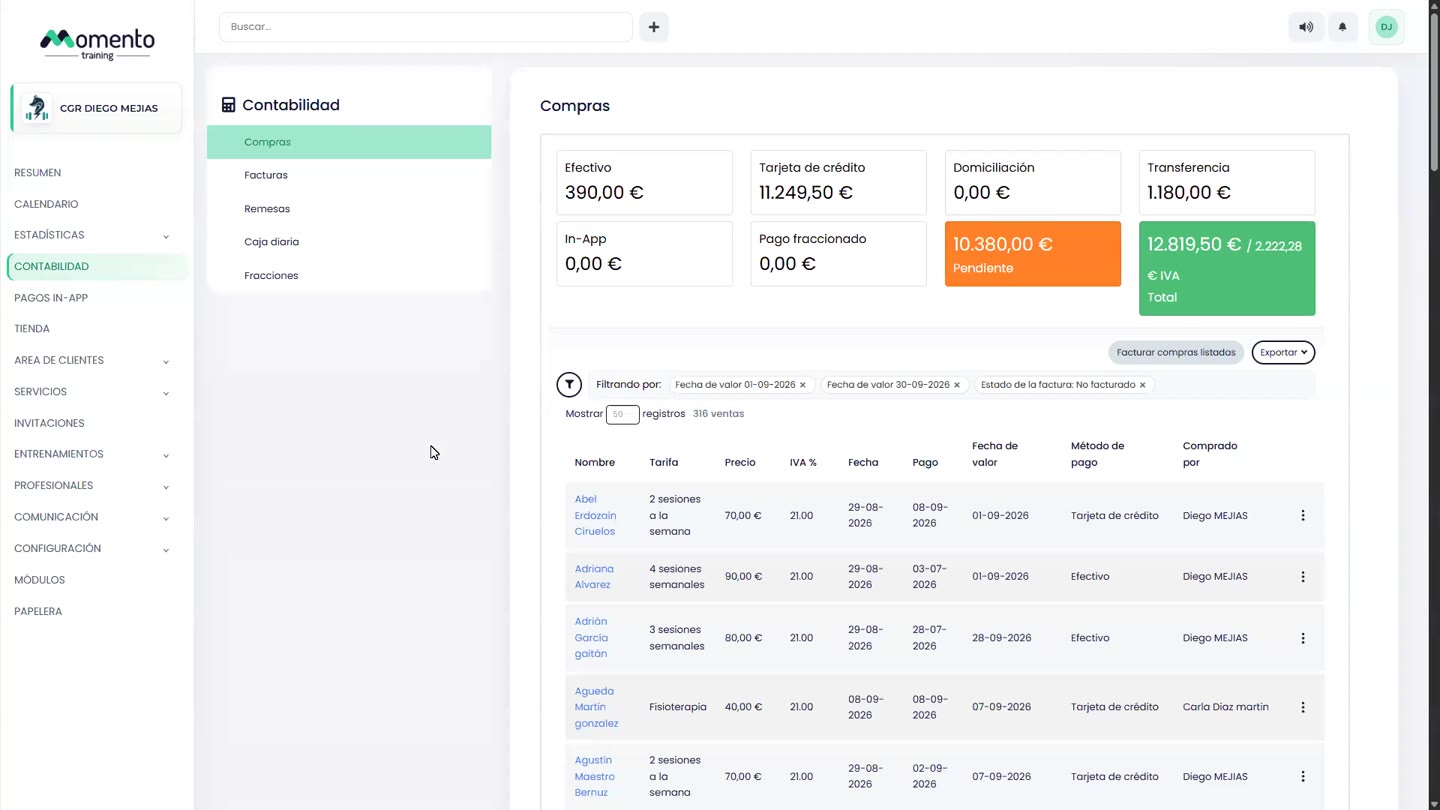
Compras
This section covers the Compras area in MomentoTraining.
Use it to understand where the option belongs, what information to review, and what result to check after making a change.
If the action affects clients, bookings, payments, or notifications, review the result before continuing with other changes.
Diferencia entre fecha de venta, fecha de pago y fecha valor
This section covers the Diferencia entre fecha de venta, fecha de pago y fecha valor area in MomentoTraining.
Use it to understand where the option belongs, what information to review, and what result to check after making a change.
If the action affects clients, bookings, payments, or notifications, review the result before continuing with other changes.
Estados de compras
This section covers the Estados de compras area in MomentoTraining.
Use it to understand where the option belongs, what information to review, and what result to check after making a change.
If the action affects clients, bookings, payments, or notifications, review the result before continuing with other changes.
Filtros de compras
This section covers the Filtros de compras area in MomentoTraining.
Use it to understand where the option belongs, what information to review, and what result to check after making a change.
If the action affects clients, bookings, payments, or notifications, review the result before continuing with other changes.
Facturar compras listadas
This section covers the Facturar compras listadas area in MomentoTraining.
Use it to understand where the option belongs, what information to review, and what result to check after making a change.
If the action affects clients, bookings, payments, or notifications, review the result before continuing with other changes.
Recomendaciones antes de facturar en bloque
This section covers the Recomendaciones antes de facturar en bloque area in MomentoTraining.
Use it to understand where the option belongs, what information to review, and what result to check after making a change.
If the action affects clients, bookings, payments, or notifications, review the result before continuing with other changes.
Acciones sobre una compra
This section covers the Acciones sobre una compra area in MomentoTraining.
Use it to understand where the option belongs, what information to review, and what result to check after making a change.
If the action affects clients, bookings, payments, or notifications, review the result before continuing with other changes.
Sesiones y fecha de uso
This section covers the Sesiones y fecha de uso area in MomentoTraining.
Use it to understand where the option belongs, what information to review, and what result to check after making a change.
If the action affects clients, bookings, payments, or notifications, review the result before continuing with other changes.
Detalles de venta
This section covers the Detalles de venta area in MomentoTraining.
Use it to understand where the option belongs, what information to review, and what result to check after making a change.
If the action affects clients, bookings, payments, or notifications, review the result before continuing with other changes.
Editar una compra
This section covers the Editar una compra area in MomentoTraining.
Use it to understand where the option belongs, what information to review, and what result to check after making a change.
If the action affects clients, bookings, payments, or notifications, review the result before continuing with other changes.
Actualizar vencimiento
This section covers the Actualizar vencimiento area in MomentoTraining.
Use it to understand where the option belongs, what information to review, and what result to check after making a change.
If the action affects clients, bookings, payments, or notifications, review the result before continuing with other changes.
Marcar como no pagada
This section covers the Marcar como no pagada area in MomentoTraining.
Use it to understand where the option belongs, what information to review, and what result to check after making a change.
If the action affects clients, bookings, payments, or notifications, review the result before continuing with other changes.
Procesar reembolso
This section covers the Procesar reembolso area in MomentoTraining.
Use it to understand where the option belongs, what information to review, and what result to check after making a change.
If the action affects clients, bookings, payments, or notifications, review the result before continuing with other changes.
Eliminar venta y saldo
This section covers the Eliminar venta y saldo area in MomentoTraining.
Use it to understand where the option belongs, what information to review, and what result to check after making a change.
If the action affects clients, bookings, payments, or notifications, review the result before continuing with other changes.
Activar autocompra
This section covers the Activar autocompra area in MomentoTraining.
Use it to understand where the option belongs, what information to review, and what result to check after making a change.
If the action affects clients, bookings, payments, or notifications, review the result before continuing with other changes.
Facturas
This section covers the Facturas area in MomentoTraining.
Use it to understand where the option belongs, what information to review, and what result to check after making a change.
If the action affects clients, bookings, payments, or notifications, review the result before continuing with other changes.
Descargar facturas
This section covers the Descargar facturas area in MomentoTraining.
Use it to understand where the option belongs, what information to review, and what result to check after making a change.
If the action affects clients, bookings, payments, or notifications, review the result before continuing with other changes.
Historial de factura
This section covers the Historial de factura area in MomentoTraining.
Use it to understand where the option belongs, what information to review, and what result to check after making a change.
If the action affects clients, bookings, payments, or notifications, review the result before continuing with other changes.
Editar, regenerar y eliminar facturas
This section covers the Editar, regenerar y eliminar facturas area in MomentoTraining.
Use it to understand where the option belongs, what information to review, and what result to check after making a change.
If the action affects clients, bookings, payments, or notifications, review the result before continuing with other changes.
Verifactu
This section covers the Verifactu area in MomentoTraining.
Use it to understand where the option belongs, what information to review, and what result to check after making a change.
If the action affects clients, bookings, payments, or notifications, review the result before continuing with other changes.
Remesas
This section covers the Remesas area in MomentoTraining.
Use it to understand where the option belongs, what information to review, and what result to check after making a change.
If the action affects clients, bookings, payments, or notifications, review the result before continuing with other changes.
Crear una nueva remesa
This section covers the Crear una nueva remesa area in MomentoTraining.
Use it to understand where the option belongs, what information to review, and what result to check after making a change.
If the action affects clients, bookings, payments, or notifications, review the result before continuing with other changes.
Ventas sin remesa asociada
This section covers the Ventas sin remesa asociada area in MomentoTraining.
Use it to understand where the option belongs, what information to review, and what result to check after making a change.
If the action affects clients, bookings, payments, or notifications, review the result before continuing with other changes.
Detalle de una remesa
This section covers the Detalle de una remesa area in MomentoTraining.
Use it to understand where the option belongs, what information to review, and what result to check after making a change.
If the action affects clients, bookings, payments, or notifications, review the result before continuing with other changes.
Descargar archivo SEPA
This section covers the Descargar archivo SEPA area in MomentoTraining.
Use it to understand where the option belongs, what information to review, and what result to check after making a change.
If the action affects clients, bookings, payments, or notifications, review the result before continuing with other changes.
Marcar remesa como enviada
This section covers the Marcar remesa como enviada area in MomentoTraining.
Use it to understand where the option belongs, what information to review, and what result to check after making a change.
If the action affects clients, bookings, payments, or notifications, review the result before continuing with other changes.
Marcar como pagada
This section covers the Marcar como pagada area in MomentoTraining.
Use it to understand where the option belongs, what information to review, and what result to check after making a change.
If the action affects clients, bookings, payments, or notifications, review the result before continuing with other changes.
Marcar como no pagada o fallida
This section covers the Marcar como no pagada o fallida area in MomentoTraining.
Use it to understand where the option belongs, what information to review, and what result to check after making a change.
If the action affects clients, bookings, payments, or notifications, review the result before continuing with other changes.
Quitar una venta de una remesa
This section covers the Quitar una venta de una remesa area in MomentoTraining.
Use it to understand where the option belongs, what information to review, and what result to check after making a change.
If the action affects clients, bookings, payments, or notifications, review the result before continuing with other changes.
Generar facturas desde remesas
This section covers the Generar facturas desde remesas area in MomentoTraining.
Use it to understand where the option belongs, what information to review, and what result to check after making a change.
If the action affects clients, bookings, payments, or notifications, review the result before continuing with other changes.
Caja diaria
This section covers the Caja diaria area in MomentoTraining.
Use it to understand where the option belongs, what information to review, and what result to check after making a change.
If the action affects clients, bookings, payments, or notifications, review the result before continuing with other changes.
Filtros de caja diaria
This section covers the Filtros de caja diaria area in MomentoTraining.
Use it to understand where the option belongs, what information to review, and what result to check after making a change.
If the action affects clients, bookings, payments, or notifications, review the result before continuing with other changes.
Añadir registro de caja
This section covers the Añadir registro de caja area in MomentoTraining.
Use it to understand where the option belongs, what information to review, and what result to check after making a change.
If the action affects clients, bookings, payments, or notifications, review the result before continuing with other changes.
Editar o ver eventos de caja
This section covers the Editar o ver eventos de caja area in MomentoTraining.
Use it to understand where the option belongs, what information to review, and what result to check after making a change.
If the action affects clients, bookings, payments, or notifications, review the result before continuing with other changes.
Pagos fraccionados
This section covers the Pagos fraccionados area in MomentoTraining.
Use it to understand where the option belongs, what information to review, and what result to check after making a change.
If the action affects clients, bookings, payments, or notifications, review the result before continuing with other changes.
Historial de pagos fraccionados
This section covers the Historial de pagos fraccionados area in MomentoTraining.
Use it to understand where the option belongs, what information to review, and what result to check after making a change.
If the action affects clients, bookings, payments, or notifications, review the result before continuing with other changes.
Exportar pagos fraccionados
This section covers the Exportar pagos fraccionados area in MomentoTraining.
Use it to understand where the option belongs, what information to review, and what result to check after making a change.
If the action affects clients, bookings, payments, or notifications, review the result before continuing with other changes.
Diferencia entre pendiente, reservado y pagado en fracciones
This section covers the Diferencia entre pendiente, reservado y pagado en fracciones area in MomentoTraining.
Use it to understand where the option belongs, what information to review, and what result to check after making a change.
If the action affects clients, bookings, payments, or notifications, review the result before continuing with other changes.
Relación entre Contabilidad y Estadísticas
This section covers the Relación entre Contabilidad y Estadísticas area in MomentoTraining.
Use it to understand where the option belongs, what information to review, and what result to check after making a change.
If the action affects clients, bookings, payments, or notifications, review the result before continuing with other changes.
Buenas practicas en Contabilidad
This section covers the Buenas practicas en Contabilidad area in MomentoTraining.
Use it to understand where the option belongs, what information to review, and what result to check after making a change.
If the action affects clients, bookings, payments, or notifications, review the result before continuing with other changes.
Errores comunes
This section covers the Errores comunes area in MomentoTraining.
Use it to understand where the option belongs, what information to review, and what result to check after making a change.
If the action affects clients, bookings, payments, or notifications, review the result before continuing with other changes.
Permisos y visibilidad
This section covers the Permisos y visibilidad area in MomentoTraining.
Use it to understand where the option belongs, what information to review, and what result to check after making a change.
If the action affects clients, bookings, payments, or notifications, review the result before continuing with other changes.