 Help Center
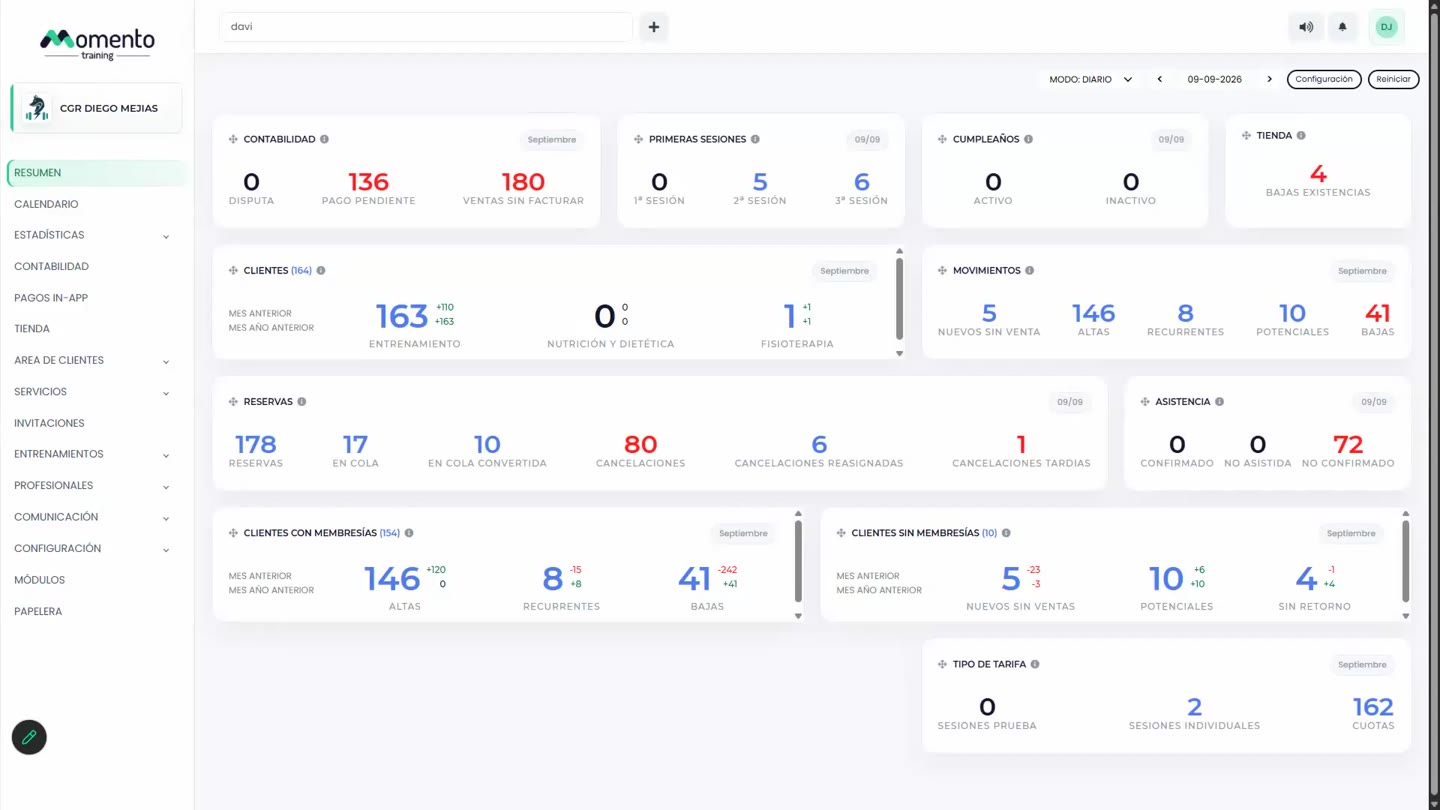
Understand and configure Overview
Review daily and monthly indicators to understand what needs attention in the center.

Use this guide to understand the main actions available in Understand and configure Overview.
Before changing settings or operational data, review the current state of the center and any existing bookings, purchases, or client records that may be affected.
Follow the sections in order when you are learning the module for the first time. Once you know the flow, use the table of contents to jump directly to the area you need.
Recommended steps
- Open Overview at the start of the day.
- Review indicators with issues or pending amounts first.
- Open the detail view for any widget that needs attention.
- Resolve each case from the matching module: calendar, clients, accounting, or shop.
Para que sirve la seccion Resumen
This section covers the Para que sirve la seccion Resumen area in MomentoTraining.
Use it to understand where the option belongs, what information to review, and what result to check after making a change.
If the action affects clients, bookings, payments, or notifications, review the result before continuing with other changes.
Selector de periodo
This section covers the Selector de periodo area in MomentoTraining.
Use it to understand where the option belongs, what information to review, and what result to check after making a change.
If the action affects clients, bookings, payments, or notifications, review the result before continuing with other changes.
Widgets o tarjetas del resumen
This section covers the Widgets o tarjetas del resumen area in MomentoTraining.
Use it to understand where the option belongs, what information to review, and what result to check after making a change.
If the action affects clients, bookings, payments, or notifications, review the result before continuing with other changes.
Configuración de widgets
This section covers the Configuración de widgets area in MomentoTraining.
Use it to understand where the option belongs, what information to review, and what result to check after making a change.
If the action affects clients, bookings, payments, or notifications, review the result before continuing with other changes.
Widget de Contabilidad
This section covers the Widget de Contabilidad area in MomentoTraining.
Use it to understand where the option belongs, what information to review, and what result to check after making a change.
If the action affects clients, bookings, payments, or notifications, review the result before continuing with other changes.
Widget de Primeras sesiones
This section covers the Widget de Primeras sesiones area in MomentoTraining.
Use it to understand where the option belongs, what information to review, and what result to check after making a change.
If the action affects clients, bookings, payments, or notifications, review the result before continuing with other changes.
Widget de Cumpleaños
This section covers the Widget de Cumpleaños area in MomentoTraining.
Use it to understand where the option belongs, what information to review, and what result to check after making a change.
If the action affects clients, bookings, payments, or notifications, review the result before continuing with other changes.
Widget de Tienda
This section covers the Widget de Tienda area in MomentoTraining.
Use it to understand where the option belongs, what information to review, and what result to check after making a change.
If the action affects clients, bookings, payments, or notifications, review the result before continuing with other changes.
Widget de Clientes
This section covers the Widget de Clientes area in MomentoTraining.
Use it to understand where the option belongs, what information to review, and what result to check after making a change.
If the action affects clients, bookings, payments, or notifications, review the result before continuing with other changes.
Widget de Movimientos
This section covers the Widget de Movimientos area in MomentoTraining.
Use it to understand where the option belongs, what information to review, and what result to check after making a change.
If the action affects clients, bookings, payments, or notifications, review the result before continuing with other changes.
Widget de Reservas
This section covers the Widget de Reservas area in MomentoTraining.
Use it to understand where the option belongs, what information to review, and what result to check after making a change.
If the action affects clients, bookings, payments, or notifications, review the result before continuing with other changes.
Widget de Asistencia
This section covers the Widget de Asistencia area in MomentoTraining.
Use it to understand where the option belongs, what information to review, and what result to check after making a change.
If the action affects clients, bookings, payments, or notifications, review the result before continuing with other changes.
Widget de Clientes con membresias
This section covers the Widget de Clientes con membresias area in MomentoTraining.
Use it to understand where the option belongs, what information to review, and what result to check after making a change.
If the action affects clients, bookings, payments, or notifications, review the result before continuing with other changes.
Widget de Clientes sin membresias
This section covers the Widget de Clientes sin membresias area in MomentoTraining.
Use it to understand where the option belongs, what information to review, and what result to check after making a change.
If the action affects clients, bookings, payments, or notifications, review the result before continuing with other changes.
Widget de Tipo de tarifa
This section covers the Widget de Tipo de tarifa area in MomentoTraining.
Use it to understand where the option belongs, what information to review, and what result to check after making a change.
If the action affects clients, bookings, payments, or notifications, review the result before continuing with other changes.
Panel lateral de Gestión del centro
This section covers the Panel lateral de Gestión del centro area in MomentoTraining.
Use it to understand where the option belongs, what information to review, and what result to check after making a change.
If the action affects clients, bookings, payments, or notifications, review the result before continuing with other changes.
Acciones disponibles desde los listados
This section covers the Acciones disponibles desde los listados area in MomentoTraining.
Use it to understand where the option belongs, what information to review, and what result to check after making a change.
If the action affects clients, bookings, payments, or notifications, review the result before continuing with other changes.
Permisos y visibilidad
This section covers the Permisos y visibilidad area in MomentoTraining.
Use it to understand where the option belongs, what information to review, and what result to check after making a change.
If the action affects clients, bookings, payments, or notifications, review the result before continuing with other changes.
Recomendaciones de uso
This section covers the Recomendaciones de uso area in MomentoTraining.
Use it to understand where the option belongs, what information to review, and what result to check after making a change.
If the action affects clients, bookings, payments, or notifications, review the result before continuing with other changes.
Cosas importantes a tener en cuenta
This section covers the Cosas importantes a tener en cuenta area in MomentoTraining.
Use it to understand where the option belongs, what information to review, and what result to check after making a change.
If the action affects clients, bookings, payments, or notifications, review the result before continuing with other changes.