 Help Center
Manage calendar, sessions, and schedules
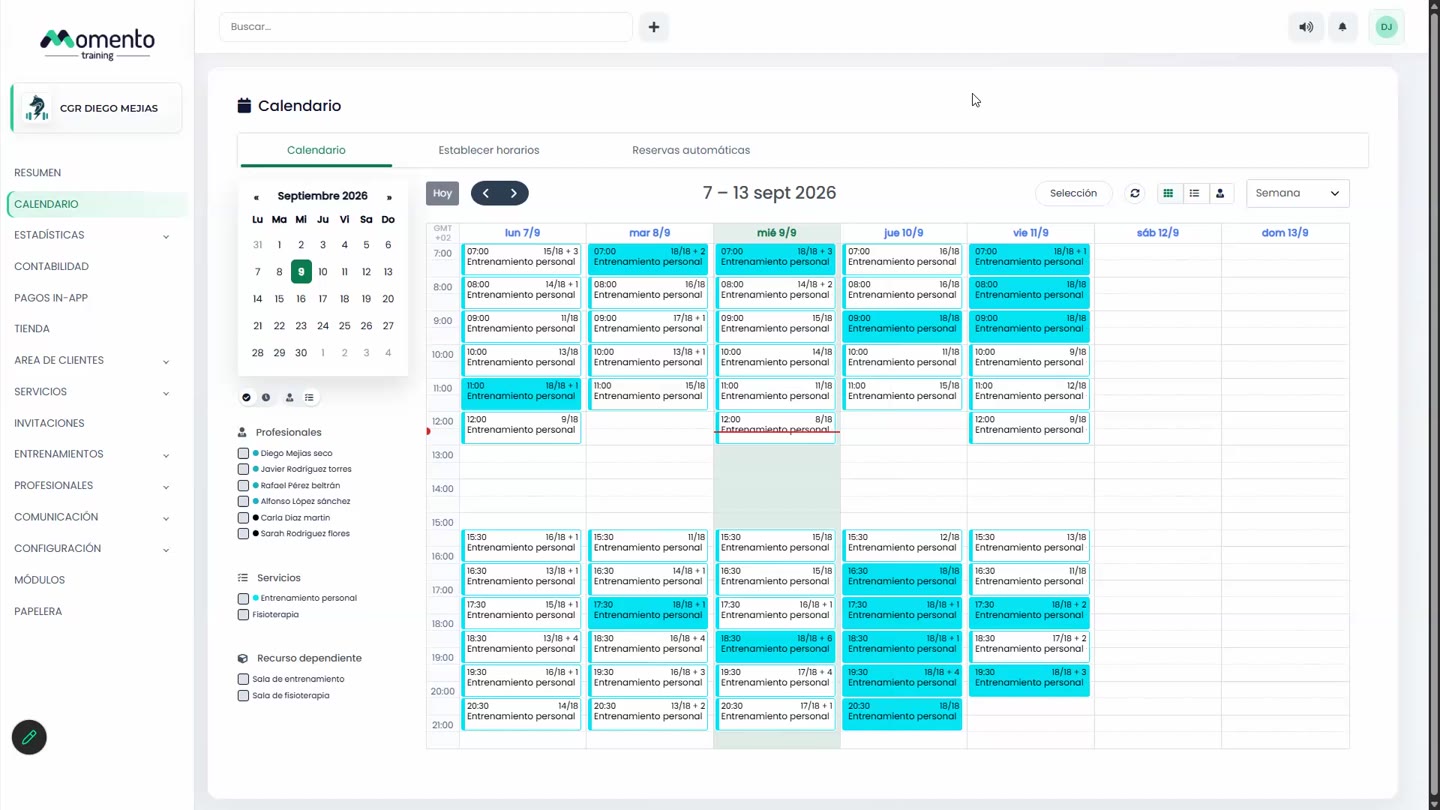
Create sessions, manage bookings, configure recurring schedules, and control attendance from Calendar.

Use this guide to understand the main actions available in Manage calendar, sessions, and schedules.
Before changing settings or operational data, review the current state of the center and any existing bookings, purchases, or client records that may be affected.
Follow the sections in order when you are learning the module for the first time. Once you know the flow, use the table of contents to jump directly to the area you need.
Recommended steps
- Go to Calendar and move to the correct date.
- Open the session, schedule, or booking you want to manage.
- Review service, professional, capacity, bookings, and status before changing anything.
- Save the change and check how it appears in the calendar.
Para que sirve el Calendario
This section covers the Para que sirve el Calendario area in MomentoTraining.
Use it to understand where the option belongs, what information to review, and what result to check after making a change.
If the action affects clients, bookings, payments, or notifications, review the result before continuing with other changes.
Pestañas principales
This section covers the Pestañas principales area in MomentoTraining.
Use it to understand where the option belongs, what information to review, and what result to check after making a change.
If the action affects clients, bookings, payments, or notifications, review the result before continuing with other changes.
Filtro de sesiones confirmadas y sin confirmar
This section covers the Filtro de sesiones confirmadas y sin confirmar area in MomentoTraining.
Use it to understand where the option belongs, what information to review, and what result to check after making a change.
If the action affects clients, bookings, payments, or notifications, review the result before continuing with other changes.
Modo de color
This section covers the Modo de color area in MomentoTraining.
Use it to understand where the option belongs, what information to review, and what result to check after making a change.
If the action affects clients, bookings, payments, or notifications, review the result before continuing with other changes.
Filtros laterales
This section covers the Filtros laterales area in MomentoTraining.
Use it to understand where the option belongs, what information to review, and what result to check after making a change.
If the action affects clients, bookings, payments, or notifications, review the result before continuing with other changes.
Modos de vista del calendario
This section covers the Modos de vista del calendario area in MomentoTraining.
Use it to understand where the option belongs, what information to review, and what result to check after making a change.
If the action affects clients, bookings, payments, or notifications, review the result before continuing with other changes.
Vista de profesionales
This section covers the Vista de profesionales area in MomentoTraining.
Use it to understand where the option belongs, what information to review, and what result to check after making a change.
If the action affects clients, bookings, payments, or notifications, review the result before continuing with other changes.
Lectura visual de ocupacion
This section covers the Lectura visual de ocupacion area in MomentoTraining.
Use it to understand where the option belongs, what information to review, and what result to check after making a change.
If the action affects clients, bookings, payments, or notifications, review the result before continuing with other changes.
Boton de actualizacion
This section covers the Boton de actualizacion area in MomentoTraining.
Use it to understand where the option belongs, what information to review, and what result to check after making a change.
If the action affects clients, bookings, payments, or notifications, review the result before continuing with other changes.
Seleccion multiple de sesiones
This section covers the Seleccion multiple de sesiones area in MomentoTraining.
Use it to understand where the option belongs, what information to review, and what result to check after making a change.
If the action affects clients, bookings, payments, or notifications, review the result before continuing with other changes.
Edicion masiva
This section covers the Edicion masiva area in MomentoTraining.
Use it to understand where the option belongs, what information to review, and what result to check after making a change.
If the action affects clients, bookings, payments, or notifications, review the result before continuing with other changes.
Bloqueo de plazas
This section covers the Bloqueo de plazas area in MomentoTraining.
Use it to understand where the option belongs, what information to review, and what result to check after making a change.
If the action affects clients, bookings, payments, or notifications, review the result before continuing with other changes.
Crear una sesion puntual
This section covers the Crear una sesion puntual area in MomentoTraining.
Use it to understand where the option belongs, what information to review, and what result to check after making a change.
If the action affects clients, bookings, payments, or notifications, review the result before continuing with other changes.
Crear un bloqueo puntual
This section covers the Crear un bloqueo puntual area in MomentoTraining.
Use it to understand where the option belongs, what information to review, and what result to check after making a change.
If the action affects clients, bookings, payments, or notifications, review the result before continuing with other changes.
Abrir el detalle de una sesion
This section covers the Abrir el detalle de una sesion area in MomentoTraining.
Use it to understand where the option belongs, what information to review, and what result to check after making a change.
If the action affects clients, bookings, payments, or notifications, review the result before continuing with other changes.
Reservar un cliente desde el detalle
This section covers the Reservar un cliente desde el detalle area in MomentoTraining.
Use it to understand where the option belongs, what information to review, and what result to check after making a change.
If the action affects clients, bookings, payments, or notifications, review the result before continuing with other changes.
Pestaña Con reserva
This section covers the Pestaña Con reserva area in MomentoTraining.
Use it to understand where the option belongs, what information to review, and what result to check after making a change.
If the action affects clients, bookings, payments, or notifications, review the result before continuing with other changes.
Confirmacion de cita
This section covers the Confirmacion de cita area in MomentoTraining.
Use it to understand where the option belongs, what information to review, and what result to check after making a change.
If the action affects clients, bookings, payments, or notifications, review the result before continuing with other changes.
Asistencia
This section covers the Asistencia area in MomentoTraining.
Use it to understand where the option belongs, what information to review, and what result to check after making a change.
If the action affects clients, bookings, payments, or notifications, review the result before continuing with other changes.
Acciones sobre una reserva
This section covers the Acciones sobre una reserva area in MomentoTraining.
Use it to understand where the option belongs, what information to review, and what result to check after making a change.
If the action affects clients, bookings, payments, or notifications, review the result before continuing with other changes.
Pestaña En cola
This section covers the Pestaña En cola area in MomentoTraining.
Use it to understand where the option belongs, what information to review, and what result to check after making a change.
If the action affects clients, bookings, payments, or notifications, review the result before continuing with other changes.
Pestaña Cancelados
This section covers the Pestaña Cancelados area in MomentoTraining.
Use it to understand where the option belongs, what information to review, and what result to check after making a change.
If the action affects clients, bookings, payments, or notifications, review the result before continuing with other changes.
Pestaña Historial
This section covers the Pestaña Historial area in MomentoTraining.
Use it to understand where the option belongs, what information to review, and what result to check after making a change.
If the action affects clients, bookings, payments, or notifications, review the result before continuing with other changes.
Editar una sesion
This section covers the Editar una sesion area in MomentoTraining.
Use it to understand where the option belongs, what information to review, and what result to check after making a change.
If the action affects clients, bookings, payments, or notifications, review the result before continuing with other changes.
Mover una sesion arrastrando
This section covers the Mover una sesion arrastrando area in MomentoTraining.
Use it to understand where the option belongs, what information to review, and what result to check after making a change.
If the action affects clients, bookings, payments, or notifications, review the result before continuing with other changes.
Eliminar una sesion
This section covers the Eliminar una sesion area in MomentoTraining.
Use it to understand where the option belongs, what information to review, and what result to check after making a change.
If the action affects clients, bookings, payments, or notifications, review the result before continuing with other changes.
Cancelar una sesion
This section covers the Cancelar una sesion area in MomentoTraining.
Use it to understand where the option belongs, what information to review, and what result to check after making a change.
If the action affects clients, bookings, payments, or notifications, review the result before continuing with other changes.
Establecer horarios
This section covers the Establecer horarios area in MomentoTraining.
Use it to understand where the option belongs, what information to review, and what result to check after making a change.
If the action affects clients, bookings, payments, or notifications, review the result before continuing with other changes.
Estados de horarios recurrentes
This section covers the Estados de horarios recurrentes area in MomentoTraining.
Use it to understand where the option belongs, what information to review, and what result to check after making a change.
If the action affects clients, bookings, payments, or notifications, review the result before continuing with other changes.
Acciones sobre horarios
This section covers the Acciones sobre horarios area in MomentoTraining.
Use it to understand where the option belongs, what information to review, and what result to check after making a change.
If the action affects clients, bookings, payments, or notifications, review the result before continuing with other changes.
Configurar sesiones dentro de un horario
This section covers the Configurar sesiones dentro de un horario area in MomentoTraining.
Use it to understand where the option belongs, what information to review, and what result to check after making a change.
If the action affects clients, bookings, payments, or notifications, review the result before continuing with other changes.
Publicar horarios
This section covers the Publicar horarios area in MomentoTraining.
Use it to understand where the option belongs, what information to review, and what result to check after making a change.
If the action affects clients, bookings, payments, or notifications, review the result before continuing with other changes.
Reservas automáticas
This section covers the Reservas automáticas area in MomentoTraining.
Use it to understand where the option belongs, what information to review, and what result to check after making a change.
If the action affects clients, bookings, payments, or notifications, review the result before continuing with other changes.
Lectura de ocupacion en reservas automáticas
This section covers the Lectura de ocupacion en reservas automáticas area in MomentoTraining.
Use it to understand where the option belongs, what information to review, and what result to check after making a change.
If the action affects clients, bookings, payments, or notifications, review the result before continuing with other changes.
Recomendaciones de uso del Calendario
This section covers the Recomendaciones de uso del Calendario area in MomentoTraining.
Use it to understand where the option belongs, what information to review, and what result to check after making a change.
If the action affects clients, bookings, payments, or notifications, review the result before continuing with other changes.
Errores comunes
This section covers the Errores comunes area in MomentoTraining.
Use it to understand where the option belongs, what information to review, and what result to check after making a change.
If the action affects clients, bookings, payments, or notifications, review the result before continuing with other changes.
Permisos y visibilidad
This section covers the Permisos y visibilidad area in MomentoTraining.
Use it to understand where the option belongs, what information to review, and what result to check after making a change.
If the action affects clients, bookings, payments, or notifications, review the result before continuing with other changes.