 Help Center
Read center statistics and reports
Use filters, periods, and reports to interpret center activity with consistent data.

Use this guide to understand the main actions available in Read center statistics and reports.
Before changing settings or operational data, review the current state of the center and any existing bookings, purchases, or client records that may be affected.
Follow the sections in order when you are learning the module for the first time. Once you know the flow, use the table of contents to jump directly to the area you need.
Recommended steps
- Open Statistics.
- Select the period and filters you want to analyze.
- Check that you are comparing data from the same center, service, or context.
- Use the report to identify trends, not to make decisions from one isolated number.
Para que sirve Estadísticas
This section covers the Para que sirve Estadísticas area in MomentoTraining.
Use it to understand where the option belongs, what information to review, and what result to check after making a change.
If the action affects clients, bookings, payments, or notifications, review the result before continuing with other changes.
Pestañas principales
This section covers the Pestañas principales area in MomentoTraining.
Use it to understand where the option belongs, what information to review, and what result to check after making a change.
If the action affects clients, bookings, payments, or notifications, review the result before continuing with other changes.
Exportar a Excel
This section covers the Exportar a Excel area in MomentoTraining.
Use it to understand where the option belongs, what information to review, and what result to check after making a change.
If the action affects clients, bookings, payments, or notifications, review the result before continuing with other changes.
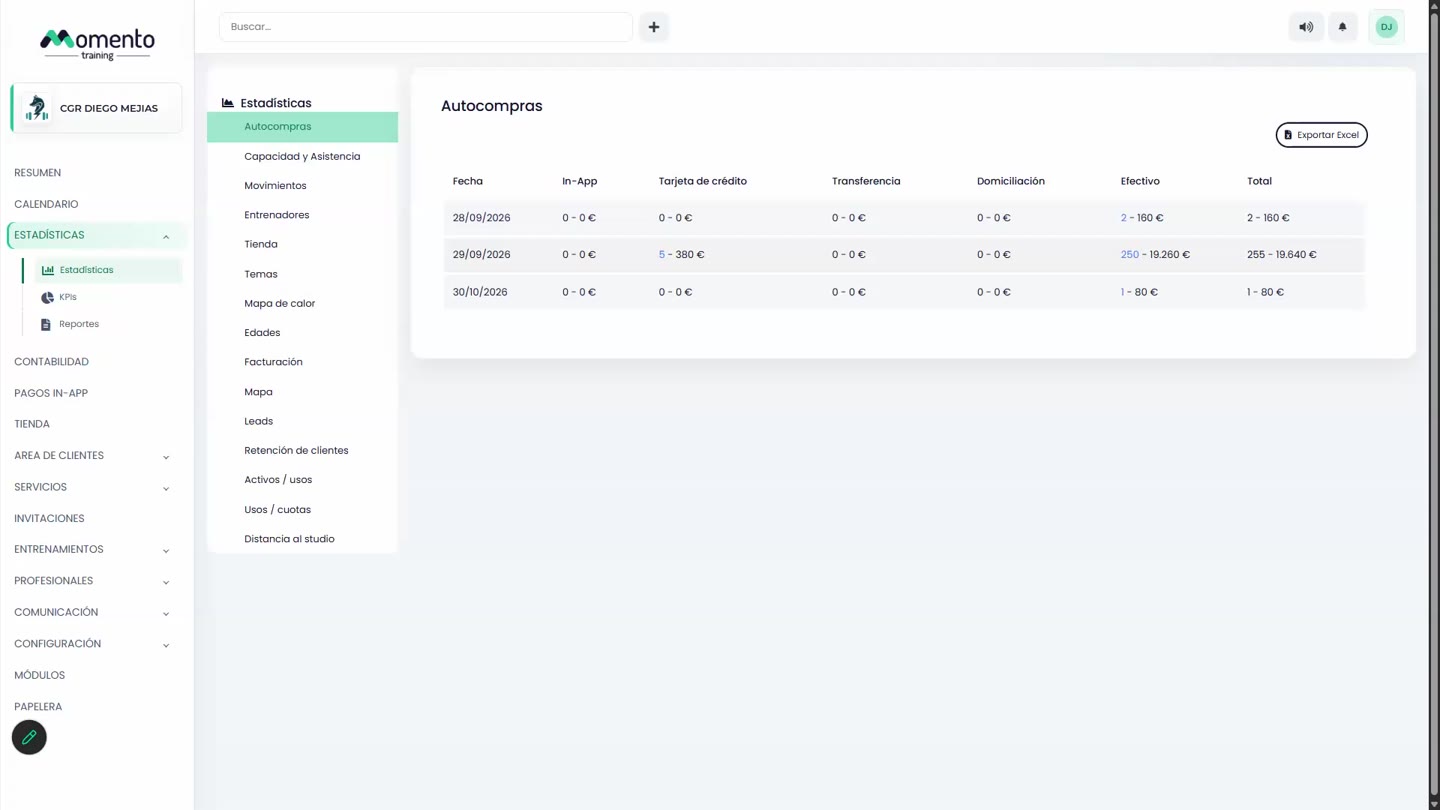
Autocompras
This section covers the Autocompras area in MomentoTraining.
Use it to understand where the option belongs, what information to review, and what result to check after making a change.
If the action affects clients, bookings, payments, or notifications, review the result before continuing with other changes.
Detalle de autocompras
This section covers the Detalle de autocompras area in MomentoTraining.
Use it to understand where the option belongs, what information to review, and what result to check after making a change.
If the action affects clients, bookings, payments, or notifications, review the result before continuing with other changes.
Cómo usar Autocompras operativamente
This section covers the Cómo usar Autocompras operativamente area in MomentoTraining.
Use it to understand where the option belongs, what information to review, and what result to check after making a change.
If the action affects clients, bookings, payments, or notifications, review the result before continuing with other changes.
Capacidad y asistencia
This section covers the Capacidad y asistencia area in MomentoTraining.
Use it to understand where the option belongs, what information to review, and what result to check after making a change.
If the action affects clients, bookings, payments, or notifications, review the result before continuing with other changes.
Detalle de capacidad y asistencia
This section covers the Detalle de capacidad y asistencia area in MomentoTraining.
Use it to understand where the option belongs, what information to review, and what result to check after making a change.
If the action affects clients, bookings, payments, or notifications, review the result before continuing with other changes.
Movimientos
This section covers the Movimientos area in MomentoTraining.
Use it to understand where the option belongs, what information to review, and what result to check after making a change.
If the action affects clients, bookings, payments, or notifications, review the result before continuing with other changes.
Cómo interpretar Movimientos
This section covers the Cómo interpretar Movimientos area in MomentoTraining.
Use it to understand where the option belongs, what information to review, and what result to check after making a change.
If the action affects clients, bookings, payments, or notifications, review the result before continuing with other changes.
Entrenadores
This section covers the Entrenadores area in MomentoTraining.
Use it to understand where the option belongs, what information to review, and what result to check after making a change.
If the action affects clients, bookings, payments, or notifications, review the result before continuing with other changes.
Cómo usar Entrenadores
This section covers the Cómo usar Entrenadores area in MomentoTraining.
Use it to understand where the option belongs, what information to review, and what result to check after making a change.
If the action affects clients, bookings, payments, or notifications, review the result before continuing with other changes.
Tienda
This section covers the Tienda area in MomentoTraining.
Use it to understand where the option belongs, what information to review, and what result to check after making a change.
If the action affects clients, bookings, payments, or notifications, review the result before continuing with other changes.
Temas
This section covers the Temas area in MomentoTraining.
Use it to understand where the option belongs, what information to review, and what result to check after making a change.
If the action affects clients, bookings, payments, or notifications, review the result before continuing with other changes.
Mapa de calor
This section covers the Mapa de calor area in MomentoTraining.
Use it to understand where the option belongs, what information to review, and what result to check after making a change.
If the action affects clients, bookings, payments, or notifications, review the result before continuing with other changes.
Cómo usar el Mapa de calor
This section covers the Cómo usar el Mapa de calor area in MomentoTraining.
Use it to understand where the option belongs, what information to review, and what result to check after making a change.
If the action affects clients, bookings, payments, or notifications, review the result before continuing with other changes.
Edades
This section covers the Edades area in MomentoTraining.
Use it to understand where the option belongs, what information to review, and what result to check after making a change.
If the action affects clients, bookings, payments, or notifications, review the result before continuing with other changes.
Facturación
This section covers the Facturación area in MomentoTraining.
Use it to understand where the option belongs, what information to review, and what result to check after making a change.
If the action affects clients, bookings, payments, or notifications, review the result before continuing with other changes.
Lectura correcta de Facturación
This section covers the Lectura correcta de Facturación area in MomentoTraining.
Use it to understand where the option belongs, what information to review, and what result to check after making a change.
If the action affects clients, bookings, payments, or notifications, review the result before continuing with other changes.
Mapa
This section covers the Mapa area in MomentoTraining.
Use it to understand where the option belongs, what information to review, and what result to check after making a change.
If the action affects clients, bookings, payments, or notifications, review the result before continuing with other changes.
Leads
This section covers the Leads area in MomentoTraining.
Use it to understand where the option belongs, what information to review, and what result to check after making a change.
If the action affects clients, bookings, payments, or notifications, review the result before continuing with other changes.
Ventana de validez de Leads
This section covers the Ventana de validez de Leads area in MomentoTraining.
Use it to understand where the option belongs, what information to review, and what result to check after making a change.
If the action affects clients, bookings, payments, or notifications, review the result before continuing with other changes.
Retencion de clientes
This section covers the Retencion de clientes area in MomentoTraining.
Use it to understand where the option belongs, what information to review, and what result to check after making a change.
If the action affects clients, bookings, payments, or notifications, review the result before continuing with other changes.
Activos uso
This section covers the Activos uso area in MomentoTraining.
Use it to understand where the option belongs, what information to review, and what result to check after making a change.
If the action affects clients, bookings, payments, or notifications, review the result before continuing with other changes.
Cómo actuar con Activos uso
This section covers the Cómo actuar con Activos uso area in MomentoTraining.
Use it to understand where the option belongs, what information to review, and what result to check after making a change.
If the action affects clients, bookings, payments, or notifications, review the result before continuing with other changes.
Usos cuotas
This section covers the Usos cuotas area in MomentoTraining.
Use it to understand where the option belongs, what information to review, and what result to check after making a change.
If the action affects clients, bookings, payments, or notifications, review the result before continuing with other changes.
Distancia al estudio
This section covers the Distancia al estudio area in MomentoTraining.
Use it to understand where the option belongs, what information to review, and what result to check after making a change.
If the action affects clients, bookings, payments, or notifications, review the result before continuing with other changes.
Cómo usar Distancia al estudio
This section covers the Cómo usar Distancia al estudio area in MomentoTraining.
Use it to understand where the option belongs, what information to review, and what result to check after making a change.
If the action affects clients, bookings, payments, or notifications, review the result before continuing with other changes.
KPIs
This section covers the KPIs area in MomentoTraining.
Use it to understand where the option belongs, what information to review, and what result to check after making a change.
If the action affects clients, bookings, payments, or notifications, review the result before continuing with other changes.
Reportes
This section covers the Reportes area in MomentoTraining.
Use it to understand where the option belongs, what information to review, and what result to check after making a change.
If the action affects clients, bookings, payments, or notifications, review the result before continuing with other changes.
Buenas practicas al usar Estadísticas
This section covers the Buenas practicas al usar Estadísticas area in MomentoTraining.
Use it to understand where the option belongs, what information to review, and what result to check after making a change.
If the action affects clients, bookings, payments, or notifications, review the result before continuing with other changes.
Errores comunes
This section covers the Errores comunes area in MomentoTraining.
Use it to understand where the option belongs, what information to review, and what result to check after making a change.
If the action affects clients, bookings, payments, or notifications, review the result before continuing with other changes.
Permisos y visibilidad
This section covers the Permisos y visibilidad area in MomentoTraining.
Use it to understand where the option belongs, what information to review, and what result to check after making a change.
If the action affects clients, bookings, payments, or notifications, review the result before continuing with other changes.